GitHub Agentic Workflows Goes GA: Markdown Automation for Issues, CI and Docs
GitHub [made Agentic Workflows generally available on October 28](https://github.blog/changelog/2026-10-28-github-agentic-workflows-generally-available/). The open-source GitHub Next project brings reasoning-driven repository tasks into GitHub Actions: developers describe work in Markdown, configure execution and compile the result into an Actions workflow.
For engineering teams, the useful shift is that recurring investigation and maintenance can use the same infrastructure as existing automation. The agent supplies interpretation; Actions supplies scheduling and execution. [Source: architecture](https://github.github.com/gh-aw/introduction/how-they-work/)
What actually runs?
A workflow combines natural-language instructions with YAML frontmatter. The CLI compiles the source into a generated `.lock.yml` file under `.github/workflows/`. Both files belong in version control; changing the configuration requires recompiling. The quickstart offers an interactive wizard for selecting an engine and setting up authentication. [Source: quickstart](https://github.github.com/gh-aw/setup/quick-start/)
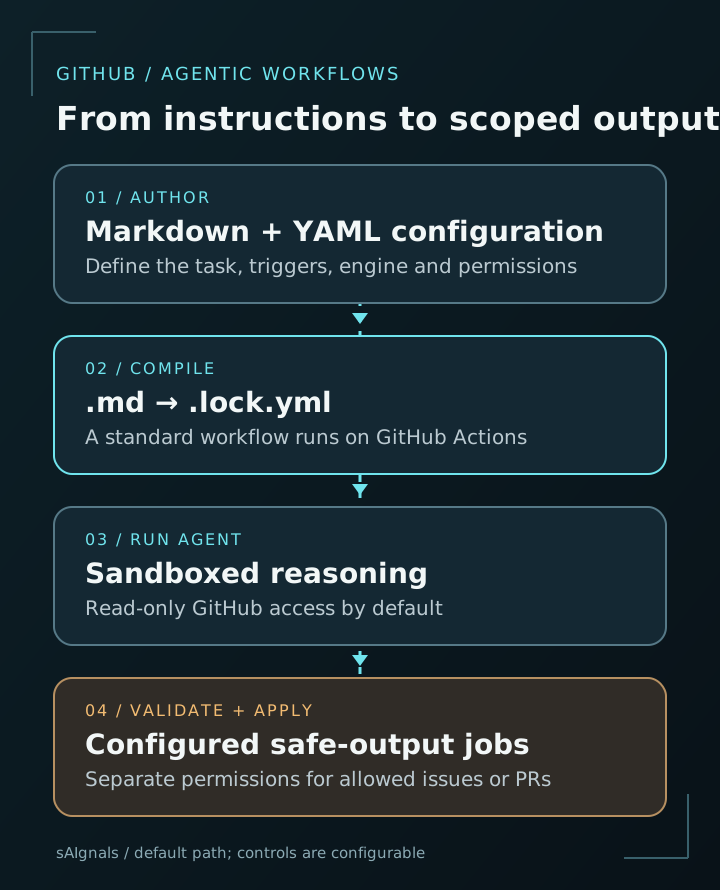
GitHub documents sandboxed agent execution with **read-only GitHub access by default**. Writes such as opening an issue, adding a comment or creating a pull request use explicitly configured **safe outputs**, handled separately with the permissions they require. This lets maintainers bound what a task may produce. [Sources: execution model](https://github.github.com/gh-aw/introduction/how-they-work/); [safe outputs](https://github.github.com/gh-aw/reference/safe-outputs/)
These controls are configurable. Read the generated workflow and its permissions, and retain the review and test requirements appropriate to the repository. A permitted pull request can still contain a bad patch.
Three useful starter tasks
The following are proposed pilot designs, rather than results from a sAIgnals benchmark:
- **CI failure investigator:** inspect a failing run and produce an issue summarizing the failure, relevant logs and a suggested next check. Begin with reporting rather than automatic patch application.
- **Documentation drift report:** compare a recent interface change with its documentation and draft a narrow update for review. Require links to the code that supports each suggested correction.
- **Repository activity brief:** summarize recent issues and pull requests into an issue report. This closely matches the official `repo-status` quickstart and offers a small, inspectable output.
For each pilot, specify the inputs, permitted output and success criteria. Measure useful reports or accepted changes, reviewer time and total usage. A schedule that runs successfully does not by itself prove the task saved work.
Availability and costs
The GA announcement lists **GitHub Free, Team and Enterprise** on github.com. The default **Copilot CLI engine requires a Copilot license**; the project also supports other agent engines. Availability of the framework therefore does not mean every engine or run is free. [Source: release announcement](https://github.blog/changelog/2026-10-28-github-agentic-workflows-generally-available/)
Budget for two components: **Actions compute and AI inference or engine usage**. The selected engine, credentials, model and workload determine the applicable bill. GitHub documents `gh aw forecast` for estimating usage; compare estimates with actual runs before expanding a schedule. [Source: cost management](https://github.github.com/gh-aw/reference/cost-management/)
Try it in a small repository first
The official quickstart begins with `gh extension install github/gh-aw`, followed by `gh aw add-wizard githubnext/agentics/repo-status`. The wizard configures authentication and workflow files and can commit, push and trigger an initial run. Review those actions before accepting its prompts. [Source: installation and first workflow](https://github.github.com/gh-aw/setup/quick-start/)
Start with one bounded report, inspect the generated YAML and resulting issue, then decide whether the evidence supports giving the workflow a broader task. Keep deterministic checks in ordinary CI and use an agent where interpretation adds value.